


All File Manager Clean
3.447.00 Reviews
App Specs
- Version
- 3.0.0
- Updated On
- License
- Free
- Downloads
- 100,000+
- Developer
- Amo Cidades
- Categories
- Tools
- Platform
- Android
Screenshots
 Analysis by AppCompare
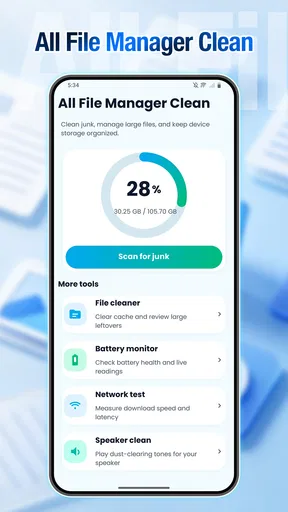
My first impression of All File Manager Clean was that it aims at a very ordinary but useful problem: the gradual mess that builds up on a phone. Downloads, screenshots, shared documents, old videos, and duplicate-looking files can make storage difficult to understand, especially when the phone’s built-in tools spread those tasks across several menus. Amo Cidades presents this free Tools app as a way to bring file management and phone cleaning into one place.
That sounds simple, but simplicity matters here. I do not want to spend an afternoon sorting folders just to find out what is taking up space. I want to open an app, understand the situation, remove what I recognize as unnecessary, and leave the files I still need alone. In my experience, this app is most useful when treated as a guided cleanup companion rather than as a complete replacement for every file tool on a phone.
From a cluttered phone to a more manageable file routine
I’ll look at how this shared-use scenario sets up a practical file routine, then turn to the boundaries that help keep personal files separate. On a household phone, the useful habit is to review items in context rather than treating every unfamiliar file as clutter; that gives the next section a clear focus on making careful choices before cleanup.
The starting condition: storage problems are usually organizational problems
A phone rarely becomes difficult to use because of one enormous file. More often, the trouble comes from small decisions postponed over time. A document is downloaded twice, a video remains after it has been shared, and screenshots that were meant to be temporary quietly stay in the gallery. By the time I notice the problem, I have already forgotten why many of those files were saved.
That is the situation where All File Manager Clean makes the most sense. Its store summary describes it as a smart file management and phone cleaning tool, while the short description reduces the idea to “All File Manager Clean.” The practical interpretation is that I can approach both browsing and cleanup from the same utility instead of jumping between the phone’s file browser, gallery, and storage settings.
I would begin with a clear goal rather than pressing every cleaning option immediately. For example, if a phone is warning that storage is nearly full, the first goal should be finding large or obviously disposable items. If the problem is simply that files are hard to locate, the goal is organization. Those are related tasks, but they are not identical, and treating them as identical can lead to accidental deletion.
The app is suitable for general audiences because its content rating is Everyone, and it is available at no cost. It has reached over one hundred thousand installs and holds a 3.3 average from roughly two hundred ratings, with several dozen written reviews. I read that combination as a sign of a useful but still somewhat mixed experience: enough adoption to show that the idea appeals to people, but not a reason to assume that every phone will feel equally smooth.
Worth Reading Before You Choose

EA SPORTS FC Mobile 26 Is a Bigger Football Game, but It Takes Time

Flipboard Shows What News Apps Must Do Beyond the Feed

Switching to Android Auto Means Rethinking Your Driving Routine

Google Calendar Makes a Crowded Week Easier to Manage

Ludo King Makes the Most of the Minutes Between Plans

Baby Panda World Brings Quick Play to Modern Phones, but Its Game Library Feels Busy
The first pass: inspect before cleaning
My preferred workflow starts with inspection. I look at what the app presents as files, then separate items into three mental groups: files I know I can remove, files I might need later, and files whose purpose is unclear. The third group is the important one. A cleaner is only helpful when it makes decisions safer, not when it encourages me to approve a long list without reading it.
For someone who is not comfortable with folders, the main benefit is having a single place to begin. Instead of guessing whether a file belongs to an application or to personal storage, I can pause and identify its name, location, and type before acting. That small habit is more valuable than any aggressive cleanup routine because it reduces the chance of losing something that only looks unimportant.
One practical tip is to clean in short sessions. I would first deal with temporary-looking downloads and old media, then stop and check whether the phone behaves normally. After that, I would continue with less obvious categories. This staged approach creates a useful handoff between discovery and deletion: I am not asking the app to make every judgment for me, and I have a chance to notice mistakes early.
A second useful habit is to use the app when I already know the source of the clutter. If I have just returned from a trip, for instance, I can review exported images, shared clips, and downloaded tickets while the context is still fresh. Cleanup is safer immediately after an event than months later, when every file has become an unexplained item in a long list.
Moving from file browsing to phone cleaning
Once I understand the contents, I can move from management to cleanup. This is where the two sides of the app work together. File management answers “where is this?” while cleaning answers “do I still need this?” Keeping those questions separate helps me avoid the common mistake of deleting a file simply because it is difficult to recognize.
I would pay particular attention to media. Photos and videos are emotionally important, but they are also easy to accumulate. A sensible workflow is to preserve anything that exists nowhere else, confirm that shared or backed-up copies are actually available, and only then consider removing local versions. The app can help surface the material I need to review, but the final decision should remain mine.
The same caution applies to documents. A file with an old date may still be needed for a tax record, a school application, a warranty, or a work handoff. Before deleting it, I would open or identify it and decide whether it belongs in an archive folder rather than the trash. This is one of the places where a conventional file manager may be better: detailed folder control is often more important than speed.
For everyday users, the best outcome is not an empty storage view. It is a phone where the remaining files are understandable. I would create a simple personal rule: remove items with a clear reason for deletion, keep anything with a current purpose, and postpone uncertain files. That rule makes a cleaning tool more trustworthy because uncertainty becomes a pause instead of an irreversible action.
A realistic handoff: cleaning after receiving files
Consider a normal scenario. A friend sends several videos through a messaging service, I download a form for an appointment, and I take screenshots of directions. The immediate task is finished, but the phone now contains files that served different purposes. Some are worth keeping, some are duplicates, and some were only needed for a few minutes.
I would open All File Manager Clean after the appointment, review the recent files, and identify the screenshots first. If the directions are no longer needed, they are easy candidates. Next I would inspect the downloaded form and move my attention to the videos. If one clip is a personal memory, I would retain it; if another was only sent for quick reference, I would remove it after confirming that I do not need it.
This workflow shows the importance of handoffs. The messaging app creates the file, the file manager helps me locate it, and the cleaning stage helps me decide whether it still belongs on the phone. No single step should silently make the next decision. I prefer an app that keeps me aware of that chain, because storage cleanup involves personal material rather than anonymous system debris.
A third non-obvious tip is to use the app as a review checkpoint after large file transfers. When moving files from a computer, receiving a batch from another person, or downloading several attachments, I would check the result before the folder becomes crowded. This turns cleanup from emergency maintenance into a small finishing step, much like clearing a desk after completing a project.
What the result feels like in practice
The result I look for is clarity rather than a dramatic before-and-after claim. I want to know which files remain, why they remain, and where I should look next time. A combined manager and cleaner can make that process less fragmented, especially for people who find the standard Android storage menus confusing or who do not want to compare several separate utility apps.
All File Manager Clean runs as version 3.0.0 and supports devices using Android 9 or newer. That makes it relevant to many existing phones, including models that are not running the newest system software. Still, compatibility on paper does not guarantee identical behavior across manufacturers. File access and storage presentation can feel different on heavily customized Android interfaces, so I would judge the app after a cautious first session rather than assuming the same workflow everywhere.
The app’s free price is a clear advantage for trying this kind of utility. I can test whether its way of presenting files suits me without committing money first. That matters because file cleaners are personal tools: one person may appreciate a broad overview, while another may prefer the precise folders and controls of the built-in Files app.
For a household phone shared by a less technical family member, I can see a practical role here. I would not ask that person to approve everything automatically, but I could use the app to teach a repeatable routine: inspect recent files, remove items with an obvious purpose for deletion, and leave unfamiliar material alone. The value is partly educational because it connects the visible file list with the consequences of keeping too much.
Where the flow breaks down
The main weakness of this type of tool is that cleaning can look easier than it really is. A list of files does not always explain why an item exists, whether another app depends on it, or whether a cloud copy is reliable. If All File Manager Clean presents a tempting batch of candidates, I would still review them individually when the names or locations are unfamiliar.
There is also a trade-off between convenience and depth. A unified cleaner can be faster than navigating system settings, but a dedicated file browser may offer more detailed folder operations, while the phone’s own storage manager may understand system-level categories more naturally. Users who regularly move large project folders, manage archives, or work with specialized file types may find a traditional file manager more appropriate.
I would also skip this app if my only need is occasional deletion of a few photos. The built-in gallery and Android storage controls may already handle that comfortably. Installing another tool makes more sense when I want a repeated file-review routine, a broader view of personal storage, or a single starting point for both browsing and cleanup.
Another friction point is trust. Any app that helps manage personal files deserves careful handling, even when the task appears routine. I would read each screen, avoid approving actions I do not understand, and keep important documents backed up independently. That is not a criticism unique to this app; it is the basic discipline required whenever a utility can influence local files.
Who should use it, and who should choose another route?
I would recommend trying All File Manager Clean if your phone feels cluttered, you frequently lose downloaded files, or you want one app to connect file browsing with cleanup. It is particularly approachable for people who do not have a clear storage routine and need a visible starting point. The free price lowers the barrier to testing it, and the Everyone rating makes it suitable for a broad audience.
I would be more cautious about recommending it to power users who need exact folder permissions, advanced transfers, or a highly specialized archive workflow. Those users may prefer the built-in Files app or a dedicated file manager with controls designed around manual organization. Likewise, if your phone already has an excellent manufacturer storage tool and your files are neatly arranged, this app may add little.
The best way to evaluate it is to run one small, low-risk session. Start with screenshots or clearly obsolete downloads, not irreplaceable photographs or work documents. Check how easy it is to identify items, how comfortable the review process feels, and whether the resulting organization is genuinely better. If the app helps you understand your storage, it has earned a place in your routine; if it merely encourages hurried deletion, the standard tools are safer.
My final take after following the full workflow
All File Manager Clean is a practical Tools app built around a sensible connection: first find files, then decide what deserves to stay. Amo Cidades has focused on a common phone problem rather than a specialized professional task, and that makes the app easy to understand. Its strongest use is not one dramatic cleaning action, but a repeatable review process that turns an unexplained pile of files into deliberate choices.
I like it most as a middle ground between scattered system menus and a highly technical file browser. It can give a less confident user a clear place to begin, while still leaving room for personal judgment. The limitations are equally important: it should not replace backups, it should not make uncertain deletion decisions for me, and it may not satisfy people who need deep manual control.
My recommendation is therefore measured but positive. Try All File Manager Clean when clutter is the problem and you want a free, approachable starting point. Use it slowly, treat every deletion as a decision, and keep important files protected elsewhere. If that workflow matches the way you manage your phone, the app can make routine cleanup feel much less scattered.
Pros
- Supports browsing and organizing multiple file types in one place.
- Includes quick search tools for finding stored files.
- Offers file cleanup features to help free up storage space.
- Simple layout makes basic file management easy for most users.
- Can help identify large or unnecessary files efficiently.
Cons
- Cleanup suggestions should be checked carefully before deleting files.
- Some advanced tools may require in-app purchases or permissions.
- Performance can vary on older or budget Android devices.
- File access permissions may raise privacy concerns for some users.
- It may offer fewer cloud-storage integrations than dedicated file managers.
FAQs for All File Manager Clean
What is All File Manager Clean used for?
All File Manager Clean is designed to help you browse, organize, and manage files stored on your mobile device. From the main interface, you can view common categories such as documents, images, videos, audio files, downloads, and archives. It also includes cleaning-oriented tools that can help identify unnecessary files, although you should review suggested items carefully before deleting anything important.
Does All File Manager Clean safely delete junk files?
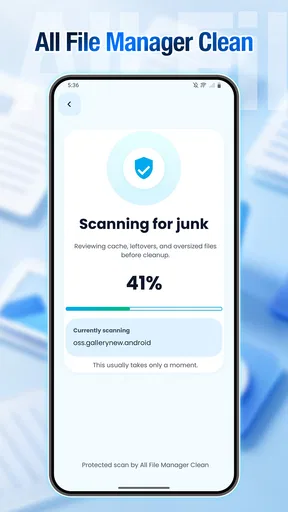
The app can scan your storage for items that may be considered unnecessary, including temporary data, cached files, duplicate content, or large files. However, “junk” classifications are not always perfect, so it is recommended that you inspect the results before confirming a cleanup. Avoid removing files from unfamiliar folders, and create a backup of important documents, photos, and videos before using bulk deletion features.
Can All File Manager Clean access all files on my phone?
To manage files effectively, All File Manager Clean may request storage or media access permissions. The exact permissions can vary depending on your Android or iOS version and the features you use. Grant only the access required for the app to work, and review its permission settings if you no longer need a particular function. The app cannot manage content it is not allowed to access.
Does All File Manager Clean support file sharing, moving, and renaming?
The file-management features are intended to make everyday organization easier, including opening files, moving them between folders, renaming items, copying content, and sharing files with other compatible apps. Support can depend on the file type, operating-system restrictions, and the applications installed on your device. Some protected system folders or cloud locations may not be fully editable.
Is All File Manager Clean free to download and use?
All File Manager Clean may be available as a free download, but some versions can include advertisements, optional purchases, or premium tools. Before installing, check the official store listing for the current pricing model, subscription details, and in-app purchase information. Also verify the developer name and recent user reviews, since features and payment requirements can change with future updates.


